
This version of the software has expired
- jateenc
- Topic Author
- New Member
-

Less
More
02 Apr 2019 15:32 #1
by jateenc
This version of the software has expired was created by jateenc
Hi guys
Can some one please assist im trying to upgrade this software, i run the updated installer but keep getting the "This version of the software has expired"
please assist
thanks
Can some one please assist im trying to upgrade this software, i run the updated installer but keep getting the "This version of the software has expired"
please assist
thanks
Please Log in or Create an account to join the conversation.
- Ian
- Offline
- Moderator
-

02 Apr 2019 21:32 - 02 Apr 2019 21:58 #2
by Ian
Replied by Ian on topic This version of the software has expired
Hi there,
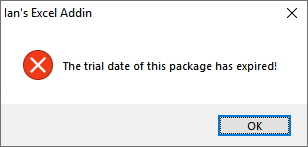
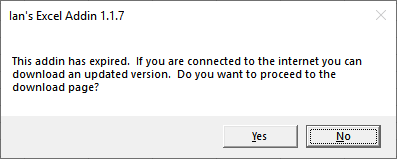
Which one of the following messages are you seeing?
1.
2.
Regards,
Ian
Which one of the following messages are you seeing?
1.
2.
Regards,
Ian
Last edit: 02 Apr 2019 21:58 by Ian. Reason: Added images
Please Log in or Create an account to join the conversation.
- jateenc
- Topic Author
- New Member
-
Less
More
04 Apr 2019 10:38 #3
by jateenc
Replied by jateenc on topic This version of the software has expired
Hi Ian
Sorry for the late reply and thanks for the speedy response
i get the second message
Thanks
Sorry for the late reply and thanks for the speedy response
i get the second message
Thanks
Please Log in or Create an account to join the conversation.
- Ian
- Offline
- Moderator
-
04 Apr 2019 13:03 #4
by Ian
Replied by Ian on topic This version of the software has expired
Please ensure that Excel is closed and then try the following steps to install the latest version.
- Press the Windows + R keys to open the Run window
- Type %appdata%\Microsoft\Excel\XLSTART and press Enter. This will open Excel's startup folder in Windows Explorer
- Delete the file named ieaaddin.xlam
- Download and run the installer again
- Open Excel again and check if the updated version is installed
Let me know how it goes.
Regards,
Ian
Please Log in or Create an account to join the conversation.
- jateenc
- Topic Author
- New Member
-
Less
More
04 Apr 2019 15:13 #5
by jateenc
Replied by jateenc on topic This version of the software has expired
HI Ian
I tried the above and the newer version does not show up in excel please advise
thanks
I tried the above and the newer version does not show up in excel please advise
thanks
Please Log in or Create an account to join the conversation.
- Ian
- Offline
- Moderator
-
04 Apr 2019 15:52 - 04 Apr 2019 16:03 #6
by Ian
Replied by Ian on topic This version of the software has expired
What files are stored in the %appdata%\Microsoft\Excel\XLSTART folder?
It would assist if you could upload a screenshot of the folder.
It would assist if you could upload a screenshot of the folder.
Last edit: 04 Apr 2019 16:03 by Ian.
Please Log in or Create an account to join the conversation.