
Importing error on item numbers and payref
- samsodien
- Topic Author
- New Member
-

Less
More
06 Oct 2022 12:26 #1
by samsodien
Importing error on item numbers and payref was created by samsodien
Hi,Thanks for the excellent work on the importing functions. I am however having a problem where some of the imported lines are showing as per below line item 10 ... could you perhaps assist as to why it does this 92/2/204 Mirror not exceeding 0,5m"² from wall No1065.89 Taking down and removing roofs, floors, panelling, ceilings, partitions, etc 10[color=
Please Log in or Create an account to join the conversation.
- Ian
- Offline
- Moderator
-

06 Oct 2022 13:59 - 06 Oct 2022 14:09 #2
by Ian
Replied by Ian on topic Importing error on item numbers and payref
Hi Samsodien,
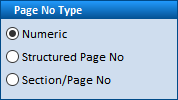
This is most likely due to using structured page numbering in WinQS. Anything other than a pure numeric value could lead to problems in this column when importing into Excel.
Try changing the page number format in WinQS to numeric prior to doing the export, and let me know how it goes.
Kind regards,
Ian
This is most likely due to using structured page numbering in WinQS. Anything other than a pure numeric value could lead to problems in this column when importing into Excel.
Try changing the page number format in WinQS to numeric prior to doing the export, and let me know how it goes.
Kind regards,
Ian
Last edit: 06 Oct 2022 14:09 by Ian. Reason: Clarification and image cleanup.
Please Log in or Create an account to join the conversation.
- samsodien
- Topic Author
- New Member
-
Less
More
07 Oct 2022 09:33 #3
by samsodien
Replied by samsodien on topic Importing error on item numbers and payref
Hi Ian,
I checked the page number is numeric, for instance the ref in winqs is 2/2/11 when importing it is changing automatically to a date showing as 2011/02/02
Do you perhaps know a work around?
Regards
Samsodien
I checked the page number is numeric, for instance the ref in winqs is 2/2/11 when importing it is changing automatically to a date showing as 2011/02/02
Do you perhaps know a work around?
Regards
Samsodien
Please Log in or Create an account to join the conversation.
- samsodien
- Topic Author
- New Member
-
Less
More
07 Oct 2022 09:46 #4
by samsodien
Replied by samsodien on topic Importing error on item numbers and payref
Hi Ian
I think I may have found the error, the pay ref column when importing into excel is taking the column data format as "general" and thus gets recognised as a date value. If when importing this can be recognised as text it will work
Regards
Samsodien
I think I may have found the error, the pay ref column when importing into excel is taking the column data format as "general" and thus gets recognised as a date value. If when importing this can be recognised as text it will work
Regards
Samsodien
Please Log in or Create an account to join the conversation.
- Ian
- Offline
- Moderator
-
08 Oct 2022 12:48 - 08 Oct 2022 12:56 #5
by Ian
Replied by Ian on topic Importing error on item numbers and payref
Hi Samsodien,
Thanks for pointing that out.
The next update, which should be available on the 15th, will import the DOC REF and PAY REF columns as text.
Kind regards,
Ian
Thanks for pointing that out.
The next update, which should be available on the 15th, will import the DOC REF and PAY REF columns as text.
Kind regards,
Ian
Last edit: 08 Oct 2022 12:56 by Ian.
Please Log in or Create an account to join the conversation.
- samsodien
- Topic Author
- New Member
-
Less
More
10 Oct 2022 09:16 #6
by samsodien
Replied by samsodien on topic Importing error on item numbers and payref
Hi Ian
Great stuff! Thank you for the assistance
Regards
Ibrahim
Great stuff! Thank you for the assistance
Regards
Ibrahim
Please Log in or Create an account to join the conversation.